Welcome!! Music class has been off to a great start this year! We have started out the year reviewing core music ideas, like beat, rhythm, and reading and playing along to notated rhythms. This year students will be learning to play along on Orff Xyolophones, which we are all very excited about! As the year goes on, we will continue to learn about music by expanding our attention to instruments of the orchestra, melody, world music, and various new musical concepts.
Throughout the year, I aim to expose students to new types of music that they have not experienced before, and to foster a love for music that they can hopefully carry forward into their future lives.
If you have any questions, please reach out to me at [email protected]
Thank you!
Ms. Gabby
..................................
2026-2027 Program Performance Dates
3rd Grade Veterans Day Program - November 10th, 6pm
2nd Grade Christmas Program - December 10th, 6pm
1st Grade Spring Program - March 18th, 6pm
Kindergarten Spring Program - April 29th, 6pm
4th Grade Graduation Program - May 24th, 8am
..................................
Fine Arts Student of the Month Photos
..................................
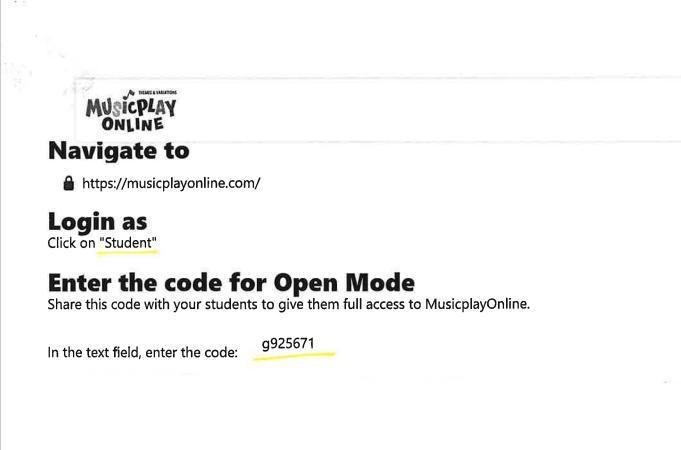
Students can access music lessons through MusicPlay Online - an online music program that I use in class. The link is available below, along with the log-in instructions. Here, students are welcome to explore and play with some musical games and songs on their own if they choose.
Some suggestions to search could be:
Units: Alphabet Songs and Activities, Bach's Fight for Freedom, Beethoven Lives Upstairs, Carnival of the Animals, History of Jazz, Instruments of the Orchestra, Peter and The Wolf, Skipping Songs, Storybooks, The Nutcracker
Games: Rhythm Racing, Space Music Adventure, Instrument Bingo, Trivia Wheel, Which Rhythm Do You Hear, Beat or Rhythm, Loud or Quiet, Smooth or Separated, Fast or Slow